Golf buggy driven through water: what to do
Written by the Hawke Electric Vehicles Service Team
Quick answer
If your golf buggy has been driven through deep water or left standing in a flood, stop using it and let it dry thoroughly before you try to drive again. The parts most at risk are the controller, the motor, the battery connections and the wiring plugs, and water sitting in any of them causes corrosion and faults over the days that follow. Dry the buggy out fully, then check those connections before returning it to use.
Tools needed
- Multimeter
- Clean dry cloths
- Contact cleaner
- Compressed air or a low-heat fan
- Safety glasses
Parts needed
- Contact cleaner
- Dielectric grease
- Replacement connectors if corroded
First, stop and assess
How much trouble you are in depends on how deep the water went and how long the buggy sat in it. A quick splash through a shallow puddle rarely does harm. Water that reached the level of the controller, the motor or the battery tops, or a buggy left standing in a flood, is a different matter and needs proper drying and inspection before use.
If the buggy went in deep or was submerged, do not switch it on to test it. Powering up wet electrics can turn a recoverable soaking into a failed controller. If it only caught a shallow splash and drives normally, still dry the underside and check the connections, because water left in a plug corrodes it over the following days.
What is at risk
| Cause | How common | How to confirm | Fix |
|---|---|---|---|
| Water in the controller or its connectors | very common | Inspect the controller area for water and its plugs for moisture | |
| Water in wiring plugs and the solenoid | very common | Open accessible connectors and look for water and corrosion | |
| Water in the motor | common | Check for water at the motor and listen for rough running once dry | |
| Corroded battery terminals and tray | common | Inspect the terminals and tray for water and fresh corrosion | |
| Water in the charging port | occasional | Inspect the charge socket for moisture before charging |
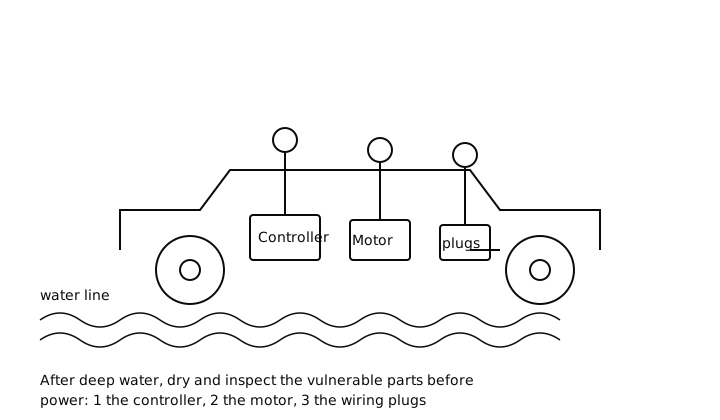
Water in the controller or its connectors
The speed controller is the most sensitive part on an electric buggy and the one most damaged by water, especially if the buggy is powered up while wet. Water bridging the connector pins can cause a dead buggy, erratic behaviour or a controller failure.
1Inspect and dry the controller area
With the key off and Tow/Run in Tow, find the controller and check the area and its plugs for water. Dry the outside, and if a plug is wet, unclip it, dry the pins, apply contact cleaner and let it air dry fully.
ExpectedNo visible moisture on or around the controller or in its plugs before you consider switching on
Do not rush this. Give a soaked buggy a day or two to dry in a warm, ventilated place, using a fan on low heat or compressed air to clear water from connectors. If the controller was submerged, have it checked before power is restored.
Water in wiring plugs and the solenoid
Multi-pin plugs and the solenoid connections trap water and corrode from the inside. A plug that looks fine outside can be wet within, and the corrosion that follows causes intermittent faults weeks later.
2Open and dry accessible connectors
Unclip the connectors you can reach safely, look for water and green or white corrosion, dry them, and treat clean pins with a little dielectric grease before reconnecting.
ExpectedDry, clean, bright pins; corrosion means the connector needs cleaning or replacing
Water in the motor
If the water reached the motor, it can get inside and cause rough running, noise or, on brushed motors, problems with the brushes and commutator. A motor that has taken on water usually needs to dry fully and may need inspection.
3Check the motor once the buggy is dry
After a full dry-out, and only if the rest of the buggy is safe to power, listen for rough or noisy running when driving gently.
ExpectedSmooth, quiet running; roughness, noise or reduced power points to water in the motor and needs an engineer
Corroded battery terminals and tray
Flood water around the batteries corrodes the terminals and the tray, and salty or dirty water makes it worse. Left alone, corroded terminals add resistance and cause poor performance and charging faults.
4Inspect and clean the battery terminals
With the key off, check the terminals and tray for water and fresh corrosion, clean any that are affected and dry the tray.
ExpectedClean, dry terminals and tray; corrosion should be cleaned off and the connections remade and protected
Water in the charging port
Do not plug in a charger if the charge socket is wet. Water in the charging port can cause a short or corrosion at the pins, so inspect and dry the socket before you charge. The guide on water in the charging port covers this in more detail.
When to book an engineer
Book an engineer if the buggy was submerged or stood in a flood, if it will not drive or behaves erratically after drying, if the controller or motor took on water, or if you find significant corrosion in the connectors. Water damage can develop over days, so an early inspection that dries and protects the connections is far cheaper than a controller replaced after corrosion has set in.
Common questions
Can I drive my buggy straight after going through water?
Only if it was a shallow splash and the buggy drives normally, and even then you should dry the underside and check the connectors afterward. If the water reached the controller, motor or battery tops, or the buggy was submerged, do not power it up; dry it fully and inspect it first, because switching on wet electrics can cause lasting damage.
How long should I let a soaked buggy dry?
Give it a day or two in a warm, ventilated place, using a fan on low heat or compressed air to clear water from connectors and the controller area. The aim is no visible moisture in any plug before power is restored. Rushing this is the main way a recoverable soaking becomes a failed part.
Are golf buggies waterproof?
No. Most golf buggies are water resistant enough for rain and damp grass but are not designed to be driven through deep water or left standing in a flood. The controller, motor and connectors are the vulnerable points, so treat deep water as something to avoid rather than test.
Will water damage show up straight away?
Not always. A buggy can drive normally after a soaking and then develop faults over the following days and weeks as trapped water corrodes connectors and terminals from the inside. That is why drying and inspecting the connections early matters, even if it seems fine at first.
Did this fix it?
Every guide is written from manufacturer service documentation and workshop practice, then reviewed before publication. Read how we write and review our repair guides.