Golf buggy in limp mode: causes and how to clear it
Written by the Hawke Electric Vehicles Service Team
Quick answer
Limp mode is the controller deliberately cutting power to protect itself after it detects a fault, so the buggy still moves but slowly. The usual triggers are the controller overheating after hard use, low battery voltage sagging under load, or a throttle input fault. Let the buggy cool, check the pack is charged, then read any fault indicator before you power-cycle to clear it.
Tools needed
- Digital multimeter
- Note pad for the fault indicator pattern
- Safety glasses
Confirm the symptom
Limp mode is a specific behaviour: the buggy still drives but power is capped, so it feels weak and slow, and it often follows a moment of hard use such as a long hill or a hot day. Many controllers pair it with a warning: a beep, a flashing status light or a code. That deliberate, protective cut is what this guide covers.
If the buggy has gradually got slower over weeks rather than suddenly, read the guide on a slow buggy, which is usually a battery or brake-drag story. If it cuts out completely and stops rather than limping along, see the guide on a buggy that cuts out. Limp mode is the middle case: reduced but not gone, and usually with a fault indication.
What causes it
| Cause | How common | How to confirm | Fix |
|---|---|---|---|
| Controller overheating and thermal cutback | very common | Power dropped after hard use or on a hot day and returns once cool | |
| Low battery voltage cutback under load | very common | Measure the pack rested and watch it sag under load | |
| Throttle or pedal input fault | common | Read the fault indicator; check the throttle for an out-of-range signal | |
| A fault detected in the motor or wiring | common | Read the fault indicator and check connections and the motor | |
| Speed setting or programming in a low mode | occasional | Check the drive mode switch and any programmed speed setting | |
| High pack voltage cutback after regen or overcharge | occasional | Occurs downhill or just after charging; measure pack voltage |
Read the fault indicator first
Before chasing individual causes, read whatever the buggy is telling you. Many controllers show a fault through a flashing status LED, a beep pattern or a code on the display, and the pattern points to the category of fault. The meaning of each pattern is model specific, so note the number of flashes or beeps and look it up in your handbook rather than guessing.
1Note the warning pattern
With the key on, watch for a flashing status light, listen for a beep pattern and check the display, and write down exactly what you see and hear.
ExpectedA repeatable flash or beep pattern that you can match to the fault list in your handbook; no pattern means you diagnose by symptom instead
Controller overheating and thermal cutback
The most common trigger is heat. When the controller reaches its temperature limit, it cuts power to protect itself, which is why limp mode so often appears after a long climb, a heavy load or a hot day, and then clears once things cool. This is the controller working as intended, not a fault in itself, though repeated cutback can point to an underlying overload.
2Let it cool and retest
Stop, switch off and let the buggy stand in the shade for a while, then drive gently.
ExpectedFull power returns once the controller has cooled, confirming thermal cutback; if it keeps happening under normal use, the cause needs investigating
If thermal cutback keeps happening under ordinary use, look for what is overloading the controller: dragging brakes, low tyre pressures, an overloaded buggy or a struggling motor all make it work harder and run hotter. Fix the underlying drag rather than accepting repeated limp mode.
Low battery voltage cutback
Controllers also cut power when the pack voltage drops too low under load, to protect the batteries from being run flat. A tired or partly discharged pack sags heavily when you demand power, and the controller responds by limiting output, which feels like limp mode.
3Measure the pack rested and under load
Measure the pack at rest, then have a helper watch the meter while you drive gently and load it.
ExpectedA healthy pack holds up well; a rested reading well below nominal, or a heavy sag under load, means the batteries are the cause and need charging or testing
Charge the pack fully and retest. If it still sags badly when charged, the batteries are worn and the battery testing guide will help you find whether one cell is dragging the pack down.
A throttle or pedal input fault
If the controller sees a throttle signal that is out of its expected range, it limits power as a safety measure. A worn potentiometer, a failing throttle sensor or a poor connection at the pedal can all trigger this, often with its own fault code.
The throttle guides cover testing the pedal sensor for your system. If the fault indicator points to the throttle, start there rather than at the controller, because the throttle is the cheaper and more common part to fail.
A fault detected in the motor or wiring
The controller also drops into a protective mode if it detects a problem in the motor circuit or the main wiring, such as a bad connection or a motor fault. This usually comes with a specific fault code, so read the indicator and check the obvious connections, but confirming a motor or controller fault is engineer work.
Speed setting or high-voltage cutback
Two simpler causes are worth ruling out. Check the buggy is not simply in a low-speed drive mode set by a switch or programming, which mimics limp mode. And note whether the cutback happens going downhill or right after charging, which can be high-voltage cutback protecting the pack from regen or overcharge rather than a true fault.
How to clear limp mode
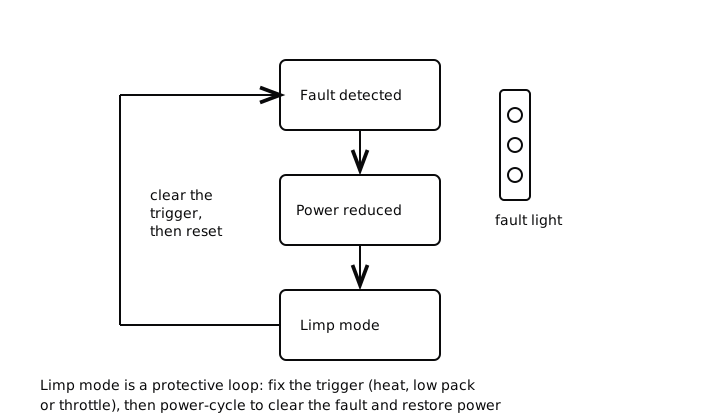
Once you have dealt with the trigger, cooled the controller, charged the pack, sorted the throttle, limp mode usually clears on its own or after a power cycle. Turning the key off, waiting, and switching back on resets many controllers, and the reset guide covers the brand-specific procedures. If limp mode returns straight away, the fault is still present and needs finding, not just clearing.
When to book an engineer
Book an engineer if limp mode keeps returning after you have cooled the controller and charged the pack, if the fault indicator points to the motor or controller, or if a throttle fault does not clear with a new sensor. Repeated limp mode is the buggy protecting itself from a real problem, so it is worth diagnosing properly rather than ignoring and risking further damage.
Common questions
What is limp mode on a golf buggy?
It is the controller deliberately capping power to protect itself and the batteries after it detects a fault, so the buggy still moves but slowly. Common triggers are the controller overheating, the pack voltage dropping too low under load, or a throttle input fault. It is a protective response, not a failure in itself.
How do I get my buggy out of limp mode?
Deal with the trigger first: let an overheated controller cool, fully charge a low pack, or fix a throttle fault. Then power-cycle by turning the key off, waiting, and switching back on, which resets many controllers. If it drops back into limp mode straight away, the underlying fault is still there.
Is it safe to drive in limp mode?
You can usually drive gently to get the buggy home, but you should not rely on it. Limp mode means the buggy is protecting itself from heat, a flat pack or a fault, and pushing on can make the underlying problem worse. Diagnose the trigger before you return it to normal use.
Why does my buggy lose power on hills then recover?
That is the classic sign of thermal cutback: the controller reaches its temperature limit on the climb, cuts power to protect itself, and restores it once it cools. If it happens under normal use, look for extra drag such as binding brakes or low tyre pressures that make the controller work harder than it should.
Guided check
Diagnose it step by step
Answer a few questions and we will point you at the most likely cause.
Question 1 of 3
Is it worst pulling away from rest?
Did this fix it?
Every guide is written from manufacturer service documentation and workshop practice, then reviewed before publication. Read how we write and review our repair guides.