How to reset a golf buggy: step-by-step reset guide
Written by the Hawke Electric Vehicles Service Team
Quick answer
You reset a golf buggy by clearing power to the controller so it restarts and drops any latched fault, starting with a simple key cycle and stepping up to a full pack-disconnect if that does not clear it. On Club Car models with an onboard computer there is an extra OBC reset using the Tow/Run switch and the main negative cable. The job needs no special tools and takes about 10 to 20 minutes.
What this fixes
This procedure resolves the faults covered in these guides.
Tools needed
- Spanner or socket to fit the battery terminal, if a pack-disconnect is needed
- Insulated gloves
- Safety glasses
- Wheel chocks
What this fixes
A reset clears a controller that has latched into a fault or a protective limp mode and refuses to respond normally. It resolves a buggy that is dead or unresponsive after an error, a buggy stuck in a slow limp-home mode, an intermittent cut-out that has left the controller sulking, and, on Club Car models with an onboard computer, a charge cycle that will not start because the computer has not reset. It is the standard first move after any electrical hiccup, because a latched fault often clears on a clean power-up.
A reset is a way to clear a stored condition, not a repair. If the underlying fault is still present, for example a genuine wiring, throttle or controller problem, the buggy will trip straight back into the same state. A reset that holds tells you the event was transient; a reset that does not hold tells you there is a real fault to find, and the guides on no drive power, intermittent cut-outs and error codes take it from there.
Tools and parts
Parts
- No parts are needed for a reset
Most resets need no tools at all. A full pack-disconnect needs a spanner or socket to fit the main battery terminal, plus insulated gloves and safety glasses, and you should chock the wheels because a successful reset can restore drive. This is a straightforward job for a careful owner and takes about 10 to 20 minutes, most of which is the waiting time that lets the controller fully power down.
How to do it
1Note the fault before you reset it
Write down what the buggy is doing and any code, light pattern or beep it is showing. A reset wipes this information, and you will want it if the fault returns.
ExpectedYou have a record of the symptom; if a fault light or code is showing, note its exact pattern before you clear it, because it is the strongest clue to the underlying cause
2Try the key-cycle reset first
Turn the key off, wait a full 30 seconds so the controller loses power completely, then turn it back on. On models with a separate drive-select or run switch, leave it in the run position for this step.
ExpectedThe controller powers up cleanly; on many faults caused by a momentary glitch, the buggy now responds normally and no further reset is needed
3Cycle the Tow/Run switch on models that have one
On models with a Tow/Run or run/neutral switch, move it to Tow with the key off, leave it for around 30 seconds, then return it to Run. This removes the controller's keep-alive supply on many systems that a key alone does not.
ExpectedOn models where the switch cuts controller power, this drops a latched fault the key cycle could not; if there is no such switch, move on to the pack-disconnect
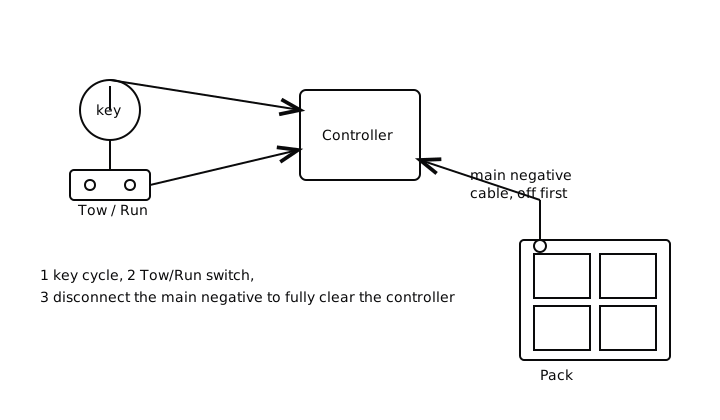
4Do a full pack-disconnect reset if the fault persists
With the key off and the drive set to Tow, undo and isolate the main negative battery cable, wait two to three minutes for the controller capacitors to bleed down, then refit the cable. This is the most complete reset because it removes every trace of power from the controller.
ExpectedAfter the wait and reconnection the controller starts from cold with no stored state; a fault that survives even this is not a latched glitch but a live problem needing diagnosis
5Follow the OBC reset on Club Car models with an onboard computer
On Club Car models fitted with an onboard computer, set the Tow/Run switch to Tow, disconnect the main negative battery cable for a few minutes, reconnect it, and return the switch to Run before switching on or plugging in the charger. This resets the computer that controls the charge circuit as well as the controller.
ExpectedThe onboard computer restarts and, where a stalled charge cycle was the complaint, the charger is now able to start on the next connection; if it still will not, the fault is beyond a reset
Check it worked
6Test drive gently and watch for the fault
With the wheels clear and the drive returned to run, switch on and drive the buggy gently on the flat, watching for the same code, cut-out or limp mode.
ExpectedA reset that has worked gives normal, full-power drive with no fault light; if the same condition returns within a few minutes or on the first load, the reset has not fixed a real fault and diagnosis is the next step
When to book an engineer
Book an engineer if the fault returns as soon as you drive, if the buggy will not reset at all, if a reset is needed repeatedly to keep the buggy moving, or if you had to note a persistent error code that comes straight back. Repeated resets mask a fault that is still there, and on a system with an onboard computer the difference between a computer fault, a controller fault and a wiring fault needs proper diagnosis rather than more resets.
Common questions
Does every golf buggy have a reset button?
Few do. Most buggies are reset by cycling power rather than by pressing a button: a key cycle, a Tow/Run switch cycle on models that have one, or a full disconnection of the main negative cable. Some controllers do carry a small reset button, but the power-cycle methods work across almost all models.
How long should I wait during a pack-disconnect reset?
Two to three minutes with the main negative cable off. That gives the capacitors inside the controller time to bleed down so it truly powers off. A quick touch off and on is often not long enough to clear a latched fault.
What is the OBC reset on a Club Car?
On Club Car models with an onboard computer, the OBC reset sets the Tow/Run switch to Tow, disconnects the main negative cable for a few minutes, then reconnects and returns the switch to Run. It restarts the computer that controls the charge circuit and is worth trying when a healthy charger and pack will not begin a charge cycle.
My buggy resets but the fault comes straight back. What now?
That tells you the fault is live, not a stored glitch. The controller is protecting itself from a real problem in the wiring, throttle, motor or controller, and it will keep tripping until that is found. Stop resetting and work through the no-drive or error-code diagnosis instead.
Can a reset harm the buggy?
Done as described, with the key off, the drive in Tow and the negative cable removed first and refitted last, a reset does not harm the buggy. The risks are electrical, so the care is in isolating the pack safely and in chocking the wheels so a restored drive cannot move the buggy unexpectedly.
Do I always have to disconnect the batteries?
No. Start with the key cycle, then the Tow/Run switch on models that have one, and only move to a full pack-disconnect if those do not clear the fault. The disconnect is the most thorough reset but also the one that needs tools and the most care.
Did this fix it?
Every guide is written from manufacturer service documentation and workshop practice, then reviewed before publication. Read how we write and review our repair guides.