Golf cart motor and controller upgrades explained
Written by the Hawke Electric Vehicles Service Team
Quick answer
A motor upgrade changes how much torque or top speed a golf cart makes, and a controller upgrade raises the current the system can deliver, so the two are normally matched as a pair. First decide whether you want more hill-climbing torque or more top speed, because the two pull in opposite directions, then confirm the batteries, cables, brakes and tires can handle the extra performance. Have the controller programmed to match the parts and check your local speed rules before you begin.
Tools needed
- Digital multimeter
- Insulated wrenches
- Safety glasses
- Cable crimping tool
- Torque wrench
- Programmer or dealer programming
Parts needed
- Upgraded motor rated for torque or speed
- Matched controller of the correct voltage and current rating
- Heavier-gauge cables where current rises
- Uprated brakes or tires if needed
- Throttle sensor to suit the new controller
What this improves
This overview lays out the common drive upgrades so you can plan a package that works together instead of buying parts that fight each other. A motor and controller upgrade goes in for more torque to climb hills or haul loads, or for more top speed on the flat. It is not a fix for a fault: if the cart has just gone slow, work through the running slow guide first, because a worn battery, a dragging brake or a failing motor will not be solved by bolting on a bigger controller.
Tools and parts
Parts
- An upgraded motor, wound for torque or for speed, to match your goal
- A matched controller of the correct pack voltage and a higher current rating
- Heavier-gauge cables and lugs wherever current rises
- Uprated brakes and suitable tires if top speed increases
- A throttle sensor compatible with the new controller
Gather a digital multimeter, insulated wrenches, a crimping tool, a torque wrench and eye protection, plus a way to program the controller, either a handheld programmer or a dealer. This is an advanced job. The parts are not hard to bolt on, but picking a matched set and programming it right is the difference between a reliable upgrade and one that drops into limp mode or cooks itself.
How to approach it
1Decide torque or speed first
Lock in your goal before you buy. A torque-wound motor pulls harder on grades but tops out lower; a speed-wound motor runs faster on the flat but climbs less well. One motor cannot give you the most of both.
ExpectedA single clear aim, more torque or more top speed, that every part is then chosen to serve
2Match the controller to the motor and pack
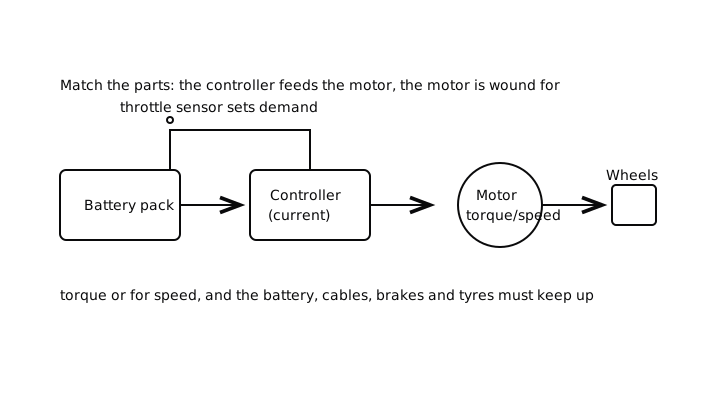
Pick a controller of the correct nominal pack voltage with a current rating that suits the motor. The controller and motor are a pair, so buy them as a matched set or on the supplier's compatibility guidance rather than mixing at random.
ExpectedA controller and motor confirmed compatible for your pack voltage, with a current rating the motor can use
3Check the supporting systems can keep up
Confirm the batteries can supply the extra current, upsize the cables where current rises, and make sure the brakes and tires suit the new performance. A faster cart has to stop and steer as well as it accelerates.
ExpectedBatteries, cables, brakes and tires all rated for the intended performance, with anything marginal upgraded
4Install the parts and program the controller
Fit the motor, controller, cables and throttle sensor as the instructions call out, torque the power connections, then program the controller to suit the motor and your settings. Programming sets current limits and speed, so it is central to a safe result.
ExpectedEverything installed and torqued, and a controller programmed to matched settings with no fault codes at power-up
Check it worked
5Test easy and watch temperatures
Drive gently at first, then build up, checking the motor and controller do not run unusually hot and that the cart stops and steers safely at the new speed. Recheck the power connections for heat after the first real run.
ExpectedSteady performance, connections that stay cool, no limp mode or fault code, and safe braking and steering at speed
When to get professional help
Get a professional if you are not confident sizing a matched motor and controller, programming the controller, or judging whether the brakes and tires suit the new speed. The wrong combination can trip into limp mode, overheat, or leave a faster cart that cannot stop safely. A technician can also advise on the legal side of raising speed where you drive, which is worth knowing before you spend.
Common questions
Do I have to upgrade the motor and controller together?
Usually yes. The controller sets the current the motor gets, so a bigger motor needs a controller that can feed it, and a bigger controller does little behind a stock motor. Matching the two as a set, and programming the controller to suit, is what gives a reliable result.
Can I get more torque and more top speed?
Not fully from one motor. A torque-wound motor climbs better but tops out lower, and a speed-wound motor runs faster but pulls less on hills. Decide which matters more for how you use the cart and choose the motor for that, because trying to max out both leaves you with neither.
Will an upgrade drain the battery faster?
More performance draws more current, so range can drop, especially with a speed setup driven hard. Make sure the batteries can supply the current comfortably, and expect to trade speed against range. That is one reason some owners pair a performance upgrade with a lithium conversion.
Is it legal to make my cart faster?
That depends entirely on where and how you use it. Raising the speed of a vehicle used on any public land can carry legal and insurance consequences, so check the rules that apply to you before upgrading. On private land the limit is safety: the brakes, tires and steering must suit the speed.
Why did my cart go into limp mode after an upgrade?
Limp mode usually follows a mismatch or a programming error: a controller current limit set wrong, an incompatible throttle sensor, or a motor and controller that do not suit each other. Recheck that the parts are matched and the controller is programmed correctly, and read the fault code the controller reports instead of guessing.
Did this fix it?
Every guide is written from manufacturer service documentation and workshop practice, then reviewed before publication. Read how we write and review our repair guides.